Model Context Protocol Integration
For LLM-based workflows, LHM provides a configurable MCP server. It can be set to be accessible both from only the machine as well as in private network. The tools are focused on creating, editing and deleting teams/players/matches/tournaments, as well as LHM and game state management.
Use LLM integration with caution; some of the tools are destructive and the model may use them to delete or overwrite existing records in LHM database.
MCP Server is available under /mcp endpoint and it uses Authorization header for authentication. It doesn't use OAuth.
Configuration
To turn on MCP Server and configure it, go to LHM Settings tab. In Additional section, there are 3 settings related to MCP Server:
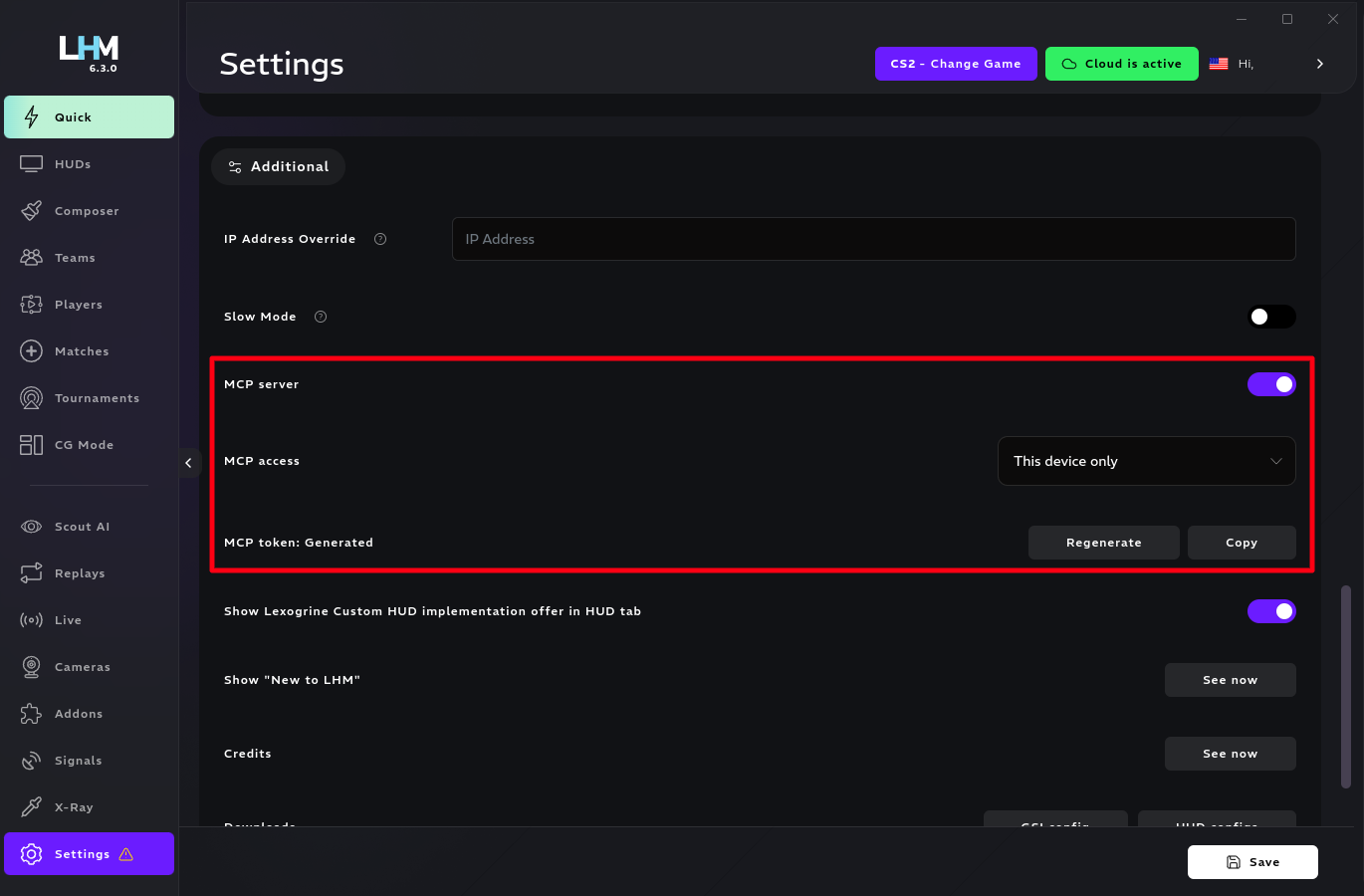
- MCP server toggle lets you turn the server on.
- MCP access select lets you choose whether the MCP integration should be available over LAN, or just from the current device.
- MCP token option lets you generate and copy a new token, to be used in Authorization header in MCP requests.
OpenCode
To integrate LHM MCP tools into OpenCode, you can use following tool definition, by e.g. putting it into opencode.json file in your project:
{
	"$schema": "https://opencode.ai/config.json",
	"mcp": {
		"lhm": {
			"type": "remote",
			"url": "http://<LHM APP IP>:1349/mcp",
			"enabled": true,
			"oauth": false,
			"headers": {
				"Authorization": "Bearer <LHM MCP TOKEN>"
			}
		}
	}
}
It's important to fill the <LHM APP IP> and <LHM MCP TOKEN> fields with appropriate values.
Tools
Tool list
| Tool | Kind | Confirmation | Description |
|---|---|---|---|
get_current_game | Read | No | Returns the selected game and supported game list. |
get_latest_game_state | Read | No | Returns the last captured game-state payload for the selected game. |
get_map_info | Read | No | Returns map data for the selected game, including veto-pool IDs, map metadata, loading state, and radar configs. |
get_arg_status | Read | No | Returns LHM Replay automation status. |
get_hud_manager_version | Read | No | Returns the running LHM version. |
get_temporary_upload_asset_upload_info | Read | No | Gives local helpers the upload details needed to add image files for later save operations. |
create_temporary_upload_asset | Write | No | Temporarily stores an image so it can be used when saving a player, team, or tournament. |
refresh_frontend | Write | No | Reloads LHM views and HUD browser pages so recent data changes appear. |
list_players | Read | No | Lists current-game players; avatar values are served image references for display or retrieval. |
save_players | Write | No | Creates players without _id and updates current-game players with _id. |
update_player_fields | Write | No | Updates the custom fields available on players for the current game. |
list_teams | Read | No | Lists current-game teams; logo values are served image references for display or retrieval. |
save_team | Write | No | Creates a team without _id or updates a current-game team with _id. |
update_team_fields | Write | No | Updates the custom fields available on teams for the current game. |
delete_resources | Write | Yes, confirm: 'delete' | Deletes one player, team, match, tournament, or signal; team deletion can optionally remove its players. |
list_matches | Read | No | Lists matches for the current game. |
save_match | Write | No | Creates a match or updates an existing match, filling missing match and veto details for the selected game. |
save_matches | Write | No | Saves multiple matches at once and reports which entries were created, updated, or failed. |
get_current_match | Read | No | Returns the active match for the current game. |
set_current_match | Write | No | Toggles the active match for the selected game; calling it with the active match ID clears the active match. |
reverse_sides | Write | No | Reverses sides for the active match or active map veto. |
create_match_veto | Write | No | Creates an online veto setup for a match when veto support is available. |
delete_match_veto | Write | Yes, confirm: 'delete' | Deletes an online veto setup. |
list_tournaments | Read | No | Lists current-game tournaments; logo values are served image references for display or retrieval. |
save_tournament | Write | No | Creates a tournament without _id or updates a current-game tournament with _id. |
get_current_tournament | Read | No | Returns the active tournament for the current game. |
set_current_tournament | Write | No | Sets, clears, or toggles the active tournament for the selected game. |
bind_match_to_matchup | Write | No | Binds a match to a tournament matchup. |
create_tournament_playoffs | Write | No | Creates a playoff tournament from a group tournament. |
recreate_tournament_match | Write | Yes, confirm: 'recreate' | Recreates and rebinds one tournament matchup match. |
recreate_all_tournament_matches | Write | Yes, confirm: 'recreate' | Recreates missing tournament matches for a stage and may delete invalid downstream matches. |
set_current_game | Write | No | Switches LHM to another game and reloads game-specific data and HUDs. |
list_huds | Read | No | Lists HUDs available for the current game. |
refresh_huds | Write | No | Refreshes active HUDs, with an optional hard refresh. |
get_hud_launch_params | Read | No | Returns saved HUD launch parameters for all games. |
set_hud_launch_params | Write | No | Stores HUD launch parameters for the selected game. |
launch_game | Write | No | Dispatches the existing launcher for the requested supported game. |
check_cs2_workshop_tools | Read | No | Checks CS2 Workshop Tools installation status. |
get_hud_orders | Read | No | Returns persisted HUD ordering entries by game. |
set_hud_orders | Write | No | Saves HUD ordering for the requested game. |
update_toggles | Write | No | Updates HUD toggle settings for the current game. |
get_live_player_order | Read | No | Returns live player ordering for the current game. |
set_live_player_order | Write | No | Sets or clears a team-specific live player order for the requested game. |
get_scout_state | Read | No | Returns Scout automation state. |
get_adr | Read | No | Returns ADR metrics for live CS2 players. |
set_camera_delay | Write | No | Applies a camera delay value to supported HUD configurations for the current game. |
send_players_to_camera | Write | No | Updates camera-room players, password, and quality, optionally broadcasting camera status changes. |
regenerate_camera_room | Write | No | Regenerates the camera room UUID and re-registers current room players. |
set_camera_fake_mode | Write | No | Enables or disables fake camera-room mode. |
get_hlae_status | Read | No | Returns whether HLAE/MIRV is connected. |
set_hlae_xray | Write | No | Sets the live HLAE X-Ray color configuration for Counter-Strike. |
revert_xray_config | Write | No | Reverts shared X-Ray configuration to defaults. |
list_keybinds | Read | No | Lists available LHM keybind actions and user overrides. |
set_keybind | Write | No | Updates a user keybind mapping. |
toggle_signal | Write | No | Toggles a signal preset active or inactive for the selected game. |
test_signal | Write | Yes, confirm: 'send' | Sends a test press to the configured Companion address. |
save_signal | Write | No | Creates or updates a current-game signal preset. |
set_companion_address | Write | No | Updates the Companion integration address. |
update_aco | Write | No | Updates Scout settings. |
toggle_aco | Write | No | Toggles Scout setting or sets it explicitly. |
connect_streamdeck | Write | No | Connects to a Stream Deck by device path. |
disconnect_streamdeck | Write | No | Disconnects the current Stream Deck. |
Images upload
As putting an entire image in a MCP tool payload could result in huge message size, LHM provides a dedicated workflow. get_temporary_upload_asset_info_tool returns an URL that the agent should use to send a request with the image file, and then it should use the returned ID when saving players, teams or tournaments. Incorrect usage of the flow by the agent can result in the uploaded images being corrupted.
Frontend refresh
Most of the editing endpoints don't cause their changes to be shown live in the app. To remedy that, there's a dedicated refresh_frontend tool that the agent should be using when finishing edits.